Blog!
Still the best name for a set of chronologically-ordered articles.
Why everyone who takes appointments should have an online scheduler
Do you take appointments for your business? You need an online scheduler. Period. Here’s why.
The reasons can be summed up in two words: FRICTION and TIME.
Friction
Believe it or not, there are people who don’t want to have to call you, or email or text, either (whether they are introverts, just busy, or whatever). If those contact methods are their only options the friction between “no appointment” and “appointment” may go up to an intolerable level. As a business owner you should want to reduce that friction as much as possible.
Time
Time is money, certainly for you, and also likely for your clients. It takes time/money to go back and forth with texts, emails, or calls. And it’s a pain. As a business owner you should want to reduce pain as much as possible (even small amounts).
How it Works
I use an online scheduler and can’t imagine going back to the old way. It’s so simple: someone requests an appointment, I send them a link to the scheduler. Existing clients learn to use the scheduler. They see all the days and times that I’m available and they pick one that works for them. I get a message saying an appointment was booked. Done. We didn’t even have to talk, email, or text. Easy and fast.
Cool Details
Note: this is based on my online scheduler of choice (see below) but chances are that all the major players have similar features.
- You can require payment at the time of booking.
- You can set parameters and limits such as “only 12 hours in advance” or “only 3 hours of appointments on Wednesday”.
- You can have intake forms attached to the booking process for common questions.
- You can sync it to your digital calendar of choice.
- People can reschedule or cancel without consulting me (I like empowering my clients).
- If a person chooses a Zoom appointment my scheduler automatically includes a link to the meeting room in the email confirmation, email reminders, and optional "add to your calendar" event. (This required me performing a one-time task of setting up an integration between the scheduler and Zoom.)
True Story
I once booked a haircut with a barber because his online scheduler made it so easy, even though I was iffy about my previous experience with him. Talk about reducing friction! Got him an extra appointment.
Surprise!
I’ve had people ask for an appointment, so I send them the scheduler link. Then I get the notice that they scheduled the appointment and it’s two weeks from now! Glad that I didn’t take the time to send a message about what my availability is over the next few days.
Another Surprise!
It’s really awesome when I get a message out of the blue that someone booked an appointment without us needing to communicate otherwise AT ALL. This cannot be overstated.
Responses to common concerns
- You can set your availability schedule to whatever you want. This may or may not line up with your business hours, your choice.
- You can make it so people can’t book same day (I’m repeating this because it was a big deal for me).
- You can manually book appointments in or out of your “office hours” (people don’t HAVE to use the online scheduler, but it’s available to them if they do).
- The one I use costs about $16/month, way less than the time I would otherwise spend making appointments (and it’s a cool pro perk for clients to save time, too).
- To reiterate, using an online scheduler is not an "all or nothing" choice. It can complement your current ways of taking appointments. Just don't be surprised if many/most of your clients end up preferring to use it rather than "the old-fashioned way".
- Yes, it is rather critical that you yourself use a digital calendar such as Google Calendar or Apple Calendar. You have to be willing to manage appointments on a computer or device. While you could theoretically manage this entirely with your scheduling software of choice a huge benefit is in syncing with a digital calendar you already use. If you don't already do that it is possible to learn but a bigger leap to make.
Which One?
I use Acuity Scheduling (now also known as Squarespace Scheduling) and have clients who use it, too. Previously I used You Can Book Me, which is also good.
I have seen people use Square and it works well for me as a client, but I don’t know about the capabilities for the provider (you). Another one is Calendly, which I am iffy on having worked with it for clients. The sticking point for me as a website creator is that these services don't seem to embed very well so it is cleaner to link out to the hosted scheduler rather than include it within a client website.
Seriously
Are you in business? Do you take appointments? Get an online scheduler. Do it for your clients if not for yourself.
If you need help setting it up I know how to do that. You can use my online scheduler to set up a consultation :-)
Domain-based email for Gmail-addicts
Did you know that you can keep the Gmail interface AND manage your personal and business email in one window?
Shocking but true: there are business people who still use a free email address* for their business email.
*You know, @gmail.com, @outlook.com, @hotmail.com, etc.
Please, if that’s you, it’s time for an upgrade.
Go Pro
You could be projecting a MUCH more professional image using a domain-based email address (e.g. @your-company.com). And you’d also be promoting your company/website every time you send an email! All for a practically negligible subscription fee (or maybe even free through your website’s hosting).
And — this is point of this little essay — if you use Gmail, you can even continue to use the Gmail interface AND manage personal and business email in one window.
This may also be possible with other free online email accounts, I’ve just never had a reason to explore it.
How (sort of)
All you need is:
a Gmail account (of course)
a registered domain (e.g. yourcompany.com)
an email-hosting service*
some know-how about which buttons to push**
With the proper “wiring” in place your domain-based email goes to your email host and is forwarded to your Gmail account. From there you can reply and send it straight out of Gmail and it arrives to the recipient as if it came from your domain-based address. The secret is that Gmail routes your message through your email host’s server.
So you can access and send your domain-based email from the familiar (and powerful) Gmail interface, right along-side your non-company Gmail address.
*Which email-hosting service?
It may be that you already have email hosting through your webhost and can use that, such as Bluehost or GoDaddy. (I hope it isn't GoDaddy.)
Or maybe you use a hosted site-builder service that doesn’t provide email, such as Squarespace or Weebly.In the latter case check out Namecheap Private Email (less than $1/month) or G Suite ($5/month).
**I can set this up for you
It’s easy when you know how, but I appreciate that this stuff can be confusing.
If you want help, that’s part of what I do. Reach out, I’ll be there.
Please, the key thing is that you get help somewhere and stop using that @gmail.com address for your business.
You and your business are better than that.
Conspiracy Santa: the Anti-Grinch
Group gift-giving made way more fun, collaborative, on-target, and mindfully less voluminous. Perfect for teams or families, at holidays or anytime a group gift-exchange is in order.
I admit it: I am a Grinch.
Or rather, I *was* until the concept of Conspiracy Santa saved Christmas for me.
How Conspiracy Santa Works
get a group of people who will participate
establish the ground rules of what a gift can be (budget, theme, timing, whatever)
assign each person a giftee within the group, Secret Santa style
start an email thread for EACH person, CCing everyone in the group EXCEPT for the person whom the thread is about (e.g. a group with 8 people will have 8 separate email threads)
discuss on the threads what each giftee likes and dislikes, blue sky ideas, potential gifts, specific links, etc
close the discussion/voting and each person gets a gift for their giftee
eagerly anticipate when everyone will get their gift
We did this last year for the eight geographically-dispersed adults in my original family (including spouses) and it was so good we’re doing it again this year.
My Grinchiness: a Retrospective
I’ll tell you what I didn’t like about gift-giving before (that I admit are MY issues, not issues with gift-giving overall):
isolation and pressure: it felt like it was up to me to figure out what to get for each person
feeling cheap: I didn’t think I had enough money to work with, especially compared to others’ means (comparison is the thief of happiness)
feeling unsure: I dislike clutter and didn’t want to give clutter, could I really think of a good idea for everyone?
as a general rule, I hate gift cards (which could be another post in itself)
volume: does everybody really need a gift from everyone? Seeing so many presents felt depressing for the consumption of it all.
Previous to Conspiracy Santa, I just felt unhappy leading up to the “big day” and even unhappier on the day itself. Yep, total Grinch.
The Anti-Grinch Solution
Conspiracy Santa neatly solves all of those issues by creating contained “communities” in the email threads where we can discuss and get excited about ideas for each giftee. We use a soft budget that is much higher than I would have spent on any one person if gifting traditionally.
We are in cahoots! I can contribute thoughts about gifts for everyone but the pressure isn’t on me to be the one to decide, we all do that together. Ideas can build and evolve: “I never would have thought of THAT idea, but now that I hear it what about if we…” The spirit of collaboration is strong and I love it.
Each person gets one gift from the group (the gifts are to be marked as from Conspiracy Santa, and part of the fun is trying to keep the associations secret). Volume is reduced and quality is enhanced.
This new tradition has brought the season a lot of joy for me, where previously there was apprehension and crankiness. Grinch begone!
Origin & Tips
The Conspiracy Santa idea comes from this blog post: https://zapier.com/blog/conspiracy-santa/
The email thread starting service is unfortunately not working anymore, so this year I had someone else start my thread (I sent them the boilerplate email for forwarding) and started all the other threads myself.
Any group is going to need a prime mover who will kick things off and nurture any threads that may be languishing. It feels helpful to add ideas, no matter how off-the-wall, rather than just prompt people over and over. You know, light a candle rather than curse the darkness.
We are using https://www.drawnames.com/ for the name draw. Tip on that: set up exclusions so people don’t draw the people they are most familiar with (e.g. spouses). Learned from last year’s experience!
Love
Conspiracy Santa is so good. It makes my heart grow three sizes. I can’t recommend it highly enough.
A happy merry season to you and yours, whatever holidays you celebrate and however you gift (if at all)!
The Hourly Billing Renaissance
Maybe hourly billing isn’t the bugaboo I’ve been led to believe. In fact, maybe it’s EXACTLY what I need to have my dream professional life, and maybe it’s actually better for my clients, too.
Maybe hourly billing isn’t the bugaboo I’ve been led to believe.
In fact, maybe it’s EXACTLY what I need to have my dream professional life, and maybe it’s actually better for my clients, too.
In other words, perhaps ALL the work I do should use the Flexible Retainer model.
I’ve tried it a few times now, and am happy to report it has gone really well.
Projects get started faster. I still need to estimate, but the estimates are much more “ballpark” and presented in a range. Project agreements are simpler.
Projects tend to launch sooner. We focus on producing rapid improvements. I can switch roles fluidly as needed to help the project succeed. Flow is enhanced. It simply feels easier and more natural.
My clients trust me, and I work hard to earn that trust. The relationship feels even more like a collaborative partnership rather than vendor/buyer.
For years and years I was told (and believed) that fixed-fee was the best way to work.
Now I realize that hourly work may have much broader applications and benefits than previously thought.
The relationship between a website, an email address, and a domain
Because if you're going to buy and own a domain, website, and email you should know how they work on a high-level.
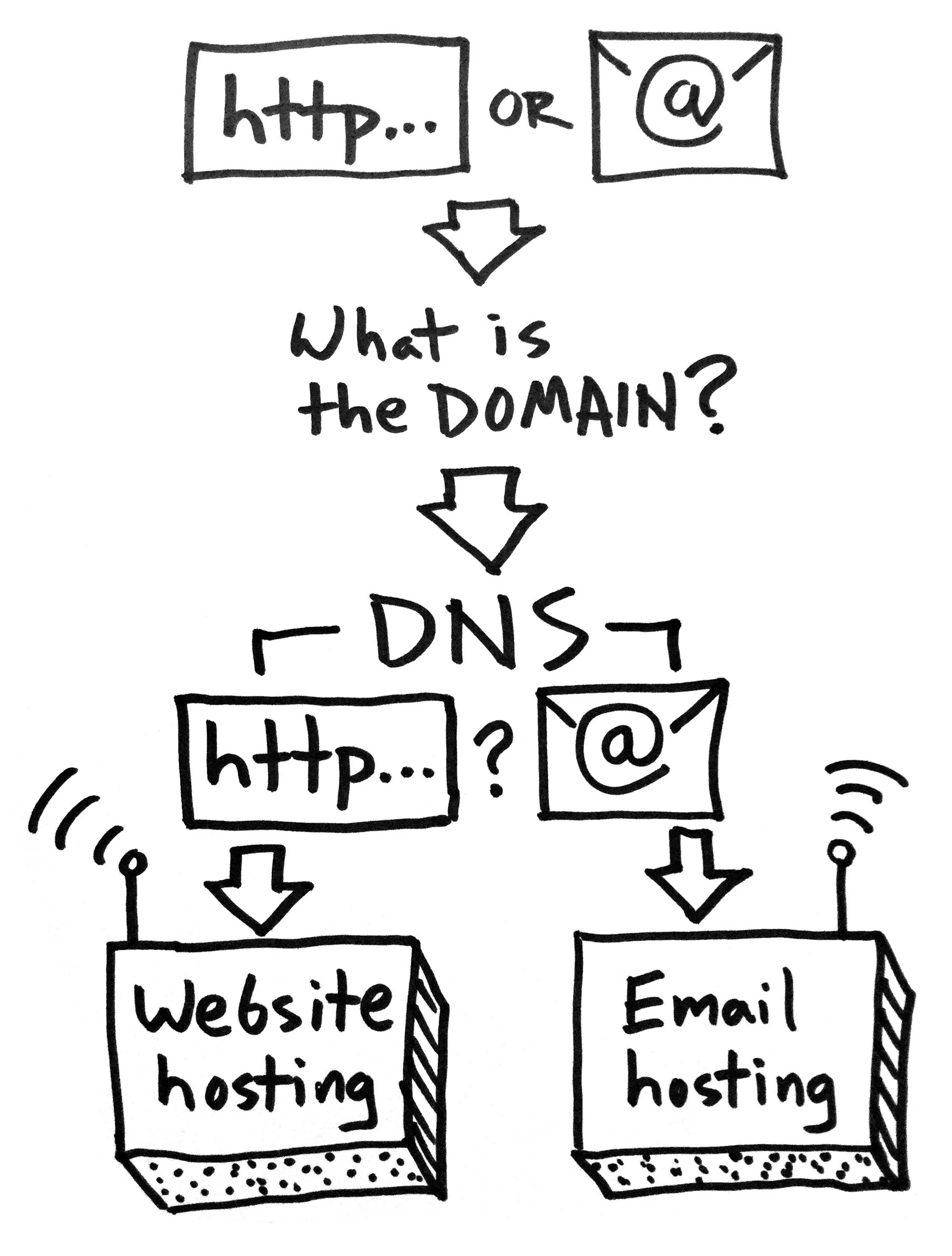
Say you enter a web address* into your browser or send an email. What happens next?
*a.k.a. a URL: Uniform Resource Locator
What is the domain?
A domain is something like yourwebsite.com
In https://www.yourwebsite.com/some-section/some-page the domain is still just yourwebsite.com
FYI — the .com part is known as a top-level domain (TLD). There are hundreds of TLDs available, such as .buzz and .clothing
FYI 2 — a subdomain is the part that comes before the domain, like in www.yourwebsite.com or news.yourwebsite.com the www and news parts are subdomains.
A domain is registered at a domain registrar.
Where does the domain point to?
The internet looks at the Domain Name Servers (DNS) of the domain to see where to send the web address request or email. It’s possible to send a web address request to one place and email to another.
Webserver / Webhosting
This is where the files that make up the web page live (which may in turn point to other webservers for more resources like images, videos, etcetera).
Email Hosting
This is where email lives and gets routed through. It’s essentially just a webserver that can handle email.
So the process looks kind of like this:

The Confusing Part
Lots of companies will handle all of this for you so people often think they are all one thing that can’t be separated. In fact your domain, website hosting, and email hosting can, and arguably should, be separated. The reasons why or why not to separate them are a whole other topic!
How I (Generally) Recommend Doing It for Your Own Website
Domain: domains are essentially a commodity, so you might as well buy them cheaply (.com domains should be about $11/year). I swear by Namecheap, which offers free email forwarding as a perk.
DNS: keep your DNS “nameservers” at your domain registrar, for flexibility’s sake.
Website hosting: many websites will be fine on “shared” webhosting, but it’s usually worthwhile to pay up for the premium shared hosting (sometimes labeled as “pro”, “turbo”, or the like). If you use a hosted site builder like Squarespace or Weebly, the hosting is part of your subscription.
Email hosting: if you can, host your email with a dedicated provider such as Google’s G Suite. This seems to avoid some of the issues that can come from using the “free” email included with your webhosting package.
I run into questions about this stuff a lot, so I hope this helps clear things up!
Padlock your website: why and how to do it
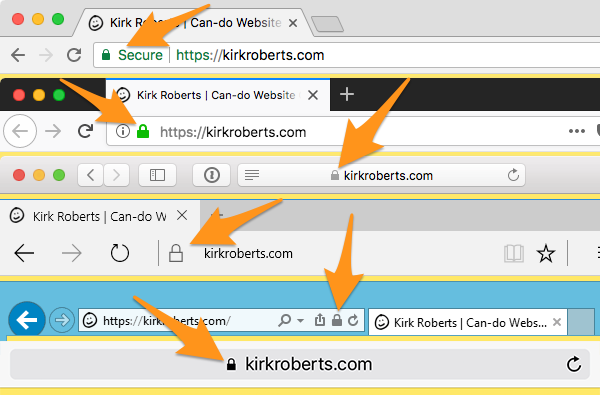
If your site is already using https:// and showing a padlock then good job, see you next time. If not, time to wrap your site up in a security blanket.
If your site is already using https:// and showing a padlock then good job, see you next time.
If not, time to wrap your site up in a security blanket.
Why
The padlock indicates when a site is using the “secure protocol”, also shown by having a URL starting with https:// rather than http:// (note the “s” in the secure version).
If you don’t have this already (for encrypted transactions) the main reason you want to add it now is because of Google.
How
If you used a site builder like Squarespace or Weebly they have help docs on how to set it up if it isn’t already.
Otherwise how you enable it depends on your webhost. Some hosts (e.g. A2 Hosting) offer free continuous Let’s Encrypt security. Others, like Bluehost, make you jump through some additional hoops but may have a free option as well.
Failing a free easy option you’ll have to pay a subscription for a Secure Sockets Layer (SSL) certificate. Just a cost of living on the internet, 2018-style.
As always, if you have questions talk to your website collaborator!
Notes
Free SSL (e.g. Let’s Encrypt) should NOT be used for sensitive data entry such as credit card info, social security numbers, etc. For that a warrantied service should be used instead. Ask your webhost or web developer.
There are some complexities around third-party services such as Google Search Console and Bing Webmaster Tools, so consult with your website pro about that.
If you are ever wondering “should I enter my [password, credit card information, or other sensitive information]?” on a site you’re visiting, do NOT simply trust it because you see https:// in the address bar. That’s a good sign, but when in doubt be safe.
Flashback: Evergreen Advice from CFC 2013
For my own reference and yours, here are my notes from the short talk I gave on the “How to Grow Your Business (With or Without Employees)” panel at the Creative Freelancer Conference at Moscone West in San Francisco held June 22-23, 2013.
For my own reference and yours, here are my notes from the short talk I gave on the “How to Grow Your Business (With or Without Employees)” panel at the Creative Freelancer Conference at Moscone West in San Francisco held June 22-23, 2013.
I deviated and ad-libbed, but this will give you the general idea of the content.
Answers
Before you look for answers, make sure you’re asking the right questions. There are lots of answers out there, but most of them have nothing to do with you.
Authorship
You are the designer of your own life. It is the biggest and most important project you’ll ever have. You are living a personal Choose Your Own Adventure book every day. You are the director and star of a real-time movie that is unfolding as we speak. Your life is a creative work of art. You may have sources, but you are the only author. Create your masterpiece.
Criticism
Criticism reveals more about the critic than the object being critiqued. This is also true of self-criticism.
Bravery & Fear
Bravery cannot exist unless there is also fear. It is normal to feel fear. Fear is an opportunity to be brave. The reward of bravery is freedom. Know the difference between good fear and bad fear. The difference is in the level of excitement you feel with the fear.
Self-Confidence
The most important quality in your life toolkit is self-confidence. Everything else is details. EVERYTHING. If you don’t have self-confidence, fake it ’til you make it. If not you, who? If not now, when?
Time
Every person on the planet — young, old, rich, poor, healthy, sick — has the exact same amount of time in the day. No more, no less. What are you giving your time to? What is not getting your time but should be?
Growth
Does growth have to mean more? Can it mean better? Can it mean less? Can it mean lateral movement?
You decide for yourself. And feel free to change your answer whenever you feel like it.
Thank you for listening.
Making New Year Resolutions Stick
I love the new year. It’s a great time to take stock of what’s important and set intentions. Here are some ideas I keep in mind to help craft my resolutions (or goals, or intentions, or tasks, or whatever) so they are meaningful and can make it out of January.
I love the new year. It’s a great time to take stock of what’s important and set intentions. There’s nothing like the symbolism of the annual calendar flip to jumpstart the process.
But… change is hard and new (good) habits often don’t form easily. Here are some ideas I keep in mind to help craft my resolutions (or goals, or intentions, or tasks, or whatever) so they are meaningful and can make it out of January.
- Think small. It’s easy to overwhelm yourself, so set an attainable goal then after you hit it you can make a new bigger one.
- Think evolution. Rather than revolution. Look for opportunities to build on something and expand it.
- Quantify goals. Nebulous goals are easily cast aside. Be hyper-specific about what you’re going to achieve.
- Think in categories. This can supply the “why” to help bolster the effort. For example: family, fitness, work, community, and personal.
- Go for higher frequencies, lower volume. It’s mentally easier to do something every day, and often more effective. For example: 10 minutes of yoga every day rather than 70 minutes once a week.
- Focus selectively. Pick out only a few items to address. Trying to change lots of things at once can cause everything to fail.
- Be accountable. Tell someone (or lots of people) you trust what your intentions are. Check in periodically with updates.
- Think long-term. Make a life change you think you could do forever, because it’s the right thing to do, for you. For example: rather than go on a diet, change your diet for good.
- Pay attention to language. Words have power; watch your self-talk. For example: it’s more powerful to say “I don’t eat sweets” than “I’m trying not to eat sweets.”
- Get back on the horse. Just because you flub up doesn’t mean you have to beat yourself up. Ask why it happened, make a change, and simply start again with a new resolve.
- Be real. Ask yourself: “Do I really want this? Why? How does this fit into my life? Is this the right time?”
- Remember this (via the Daily Calm): “Don’t give up what you want most for what you want now.”
Raise a glass of cheer to an evolutionary new year!
Essential Website Project Starter Questions
Let’s say someone asks you to build them a website (or you want to build one yourself). Here are some questions that can help you figure out what they (or you) really want and need.
Let’s say someone asks you to build them a website (or you want to build one yourself).
Here are some questions that can help you figure out what they (or you) really want and need.
(I like to say: “A website can range in complexity from one line of code all the way up to Amazon or Facebook. Let’s figure out what we’re really talking about here.”)
The Questions
- What are your goals for your website? (e.g. how does it help YOU?)
- What can people DO when they visit the website? Please provide links to similar examples online if you have them.
- What content and graphic resources do you have available right now, and can you realistically produce yourself? (logo, color palette, photos, text, video, audio, etcetera)
- Who will update the website, what will they update, and how often?
- What financial resources do you have available for the project, for initial setup and ongoing fees and maintenance? (I need to know what level of solutions I can propose)
- Are there any scheduling issues to plan around? (“must launch by…”, “I’m unavailable for collaboration during…”, etcetera)
- What other needs or wants do you have for this project? (please indicate "needs" vs. "wants”… this can be tricky)
This seems to help people get into the right mindset, past the hopelessly vague “I need a website!”
It also provides a bridge to talk about money that is much better than the reasonable but usually misconstrued request of “what’s your budget?”
There’s more to talk about with the money question, but I’ll leave that to a future message.
Two important questions about “Good news, bad news, who knows?”
I don’t usually post more than once a month or so, but here is a hopefully worthy exception.
A rare immediate follow-up
I don’t usually post more than once a month or so, but here is a hopefully worthy exception.
The previous post “Good news, bad news, who knows?” included a parable featuring a farmer.
My (rhetorical) questions to you:
- Did you assume the farmer was male?
- If so, why?
Good News, Bad News, Who Knows?
This parable helps keep me from overreacting — negatively or positively — when “big” news happens. Of course, it also applies to news of all sizes.
This parable helps keep me from overreacting — negatively or positively — when “big” news happens. Of course, it also applies to news of all sizes.
I shared it on a mailing list six years ago but it keeps coming up in conversation and I hope you agree it’s worth re-sharing!
(I’ve paraphrased it from a few different versions I’ve read.)
Once upon a time, a farmer had a valuable horse run away.
“Bad News!” said the people.
“Good news, bad news, who knows?” replied the farmer.
Later, the horse returned to the farm with many wild horses accompanying it.
“Good News!” said the people.
“Good news, bad news, who knows?” replied the farmer.
Some time after that, the farmer’s son fell and broke his leg while trying to train one of the wild horses.
“Bad News!” said the people.
“Good news, bad news, who knows?” replied the farmer.
Soon after, the army came through town conscripting all able-bodied young men, and the farmer’s son was passed over.
“Good News!” said the people.
“Good news, bad news, who knows?” replied the farmer.
Every version of the story I’ve read stops there with the idea that the cycle could continue forever.
Perhaps the next time you have Good News or Bad News you’ll think “good news, bad news, who knows?”
How to easily create “in-device” screenshots
It just takes a few smart clicks to create ready-to-use images of any website in a range of popular mobile device "frames."
Here’s an easy way to get a screenshot of a website so it looks like it’s in a mobile device.
Perfect for creating your portfolio images, or updating your old images to use more modern device frames.
Note: all images are linked to larger versions so you can more easily see details.
Download Chrome for Desktop or update Chrome
You may already have the Chrome browser installed. If not, download Chrome for free.
On a Mac you can check Chrome > About Google Chrome to make sure you have the most recent version (set up auto updates if not already enabled!).
Open Chrome & the page you want to display
Just like you’re surfing the web. Now we’re going to dive in behind-the-scenes.
Enable Developer Tools
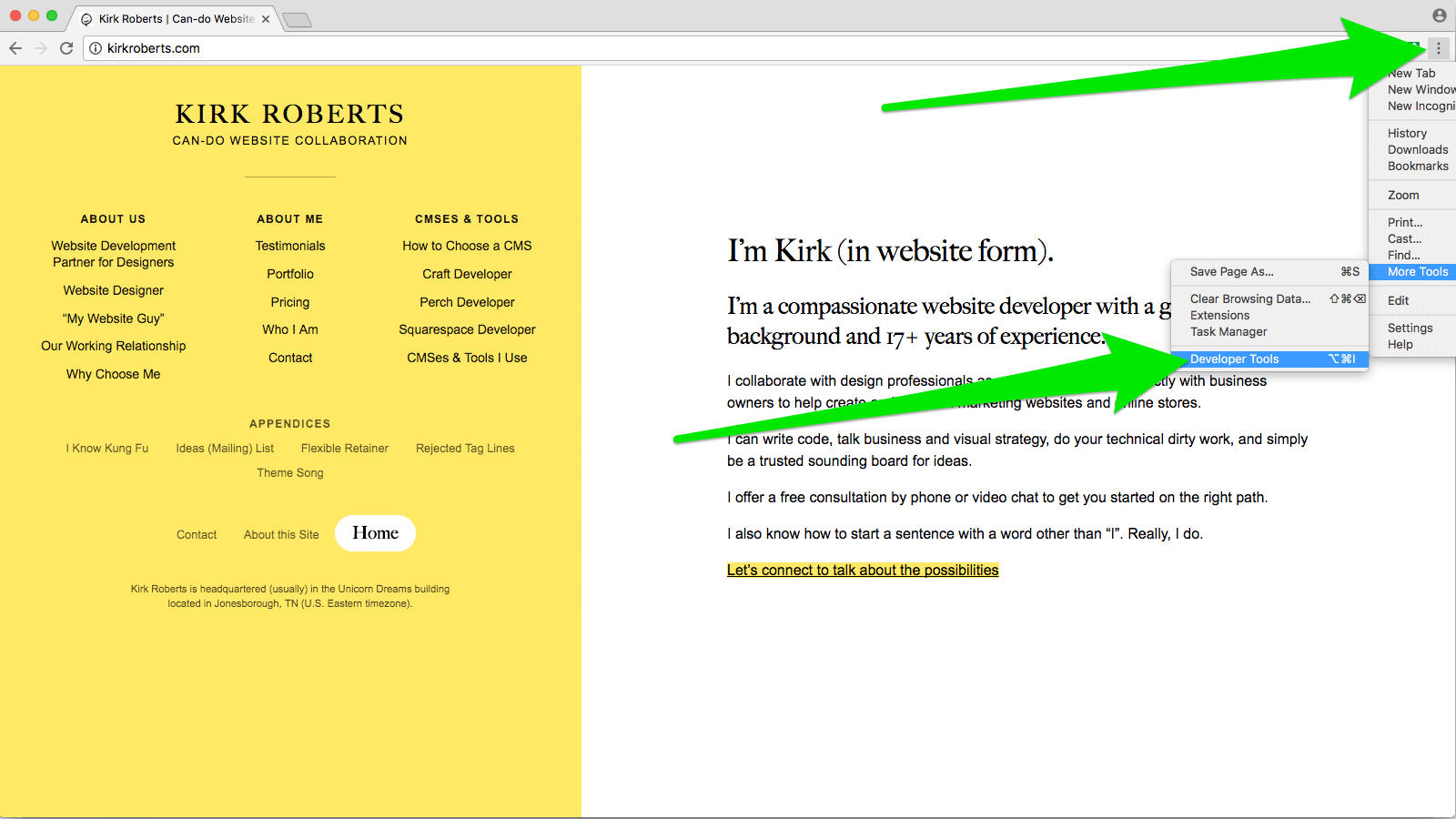
In Chrome, find the “three dots” menu at the top right of the browser window and choose More Tools > Developer Tools. Click that, opening the Developer Tools panel (may be a sidebar, at the bottom of the window, or a separate window entirely). Or, on a Mac press command-shift-I (capital I as in Ice Ice Baby) to open the panel.
Go into Responsive mode
At the top of the Developer Tools panel find the icon that looks like a phone and a tablet. Click that, which constricts the viewport and adds the “device toolbar” above the current webpage. Or, on a Mac press command-shift-M to show the device toolbar.
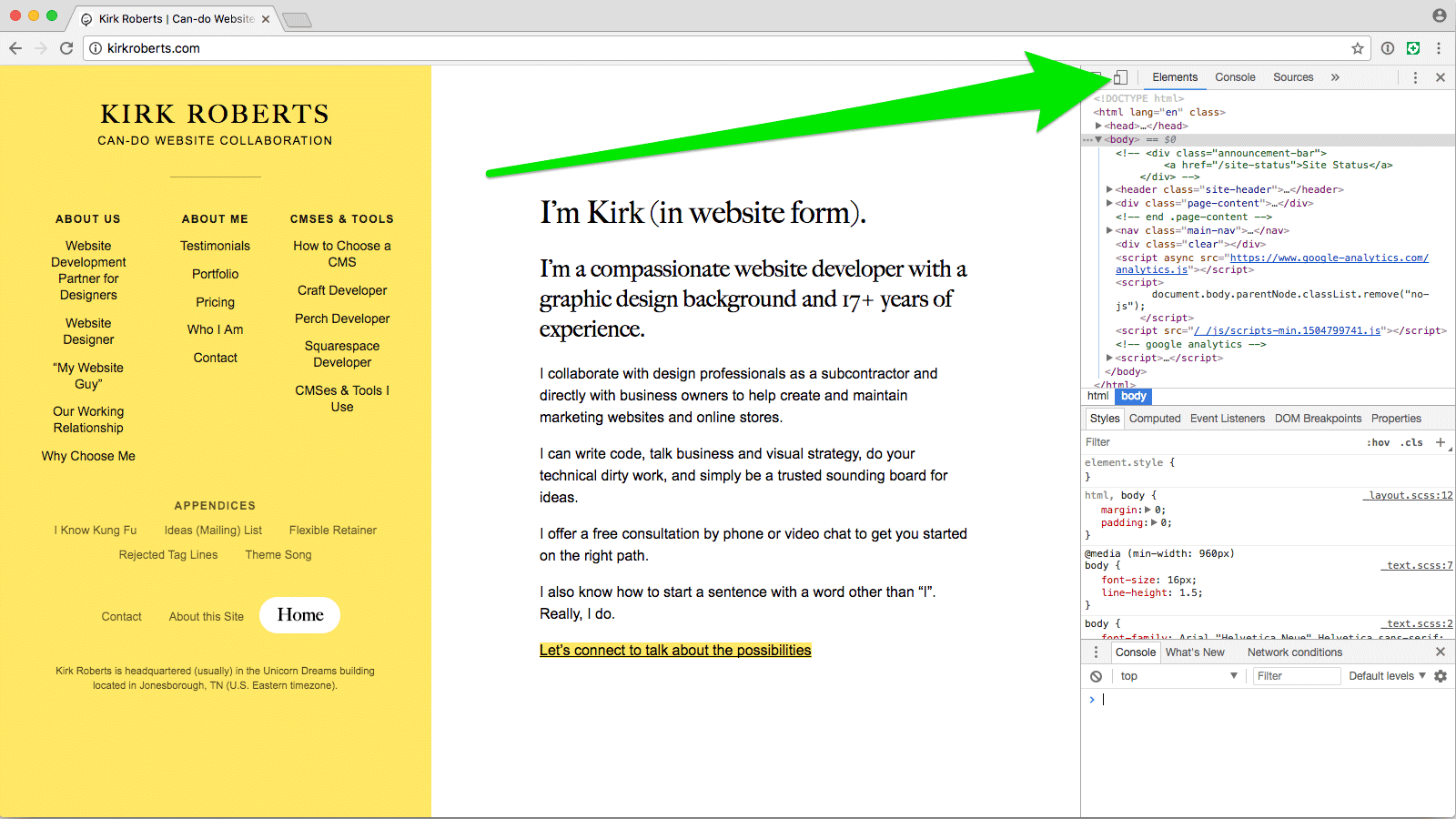
Choose the device you want
Find the “Responsive” menu at the top of the new interactive bar and choose the device you want to emulate.
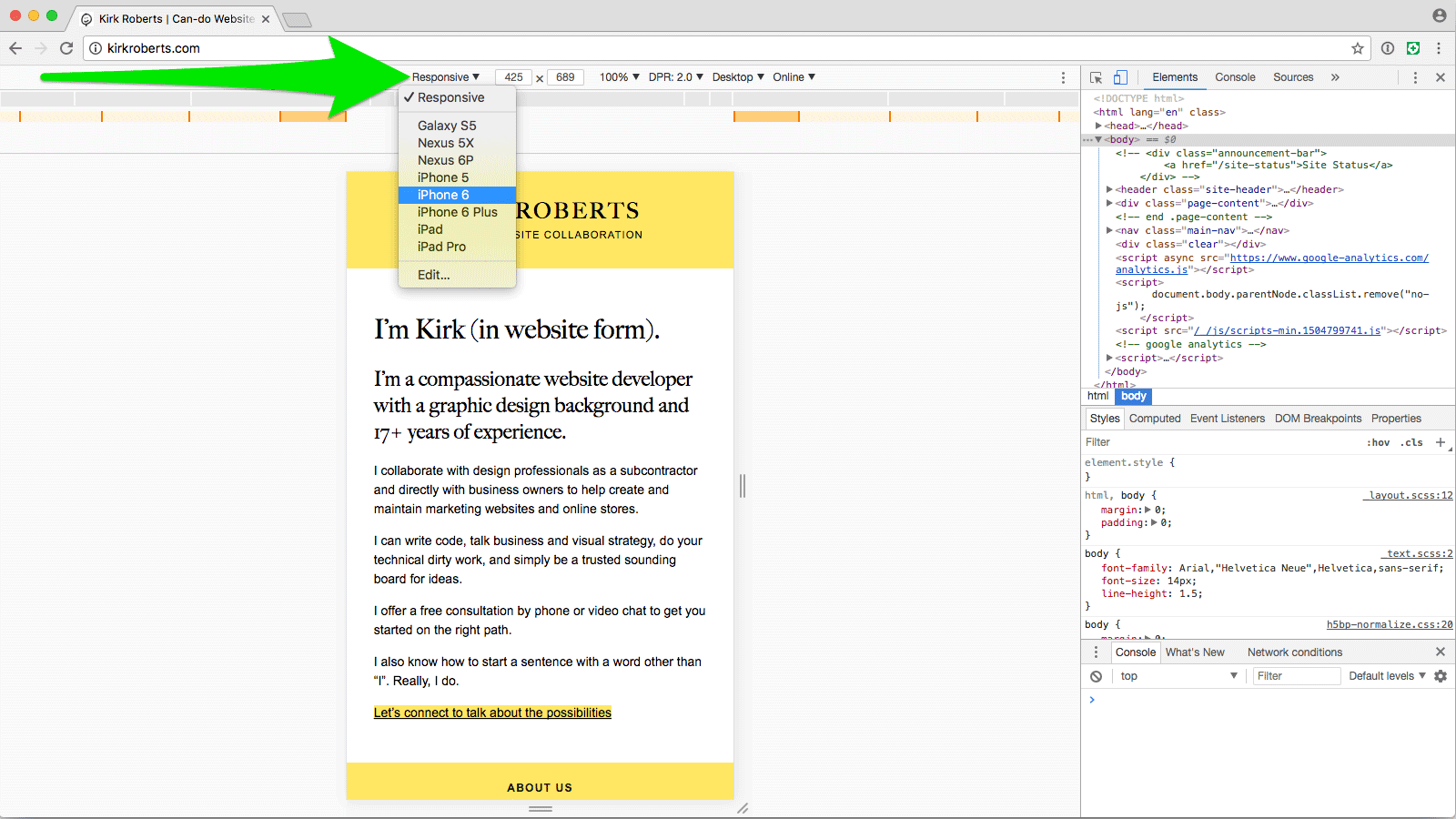
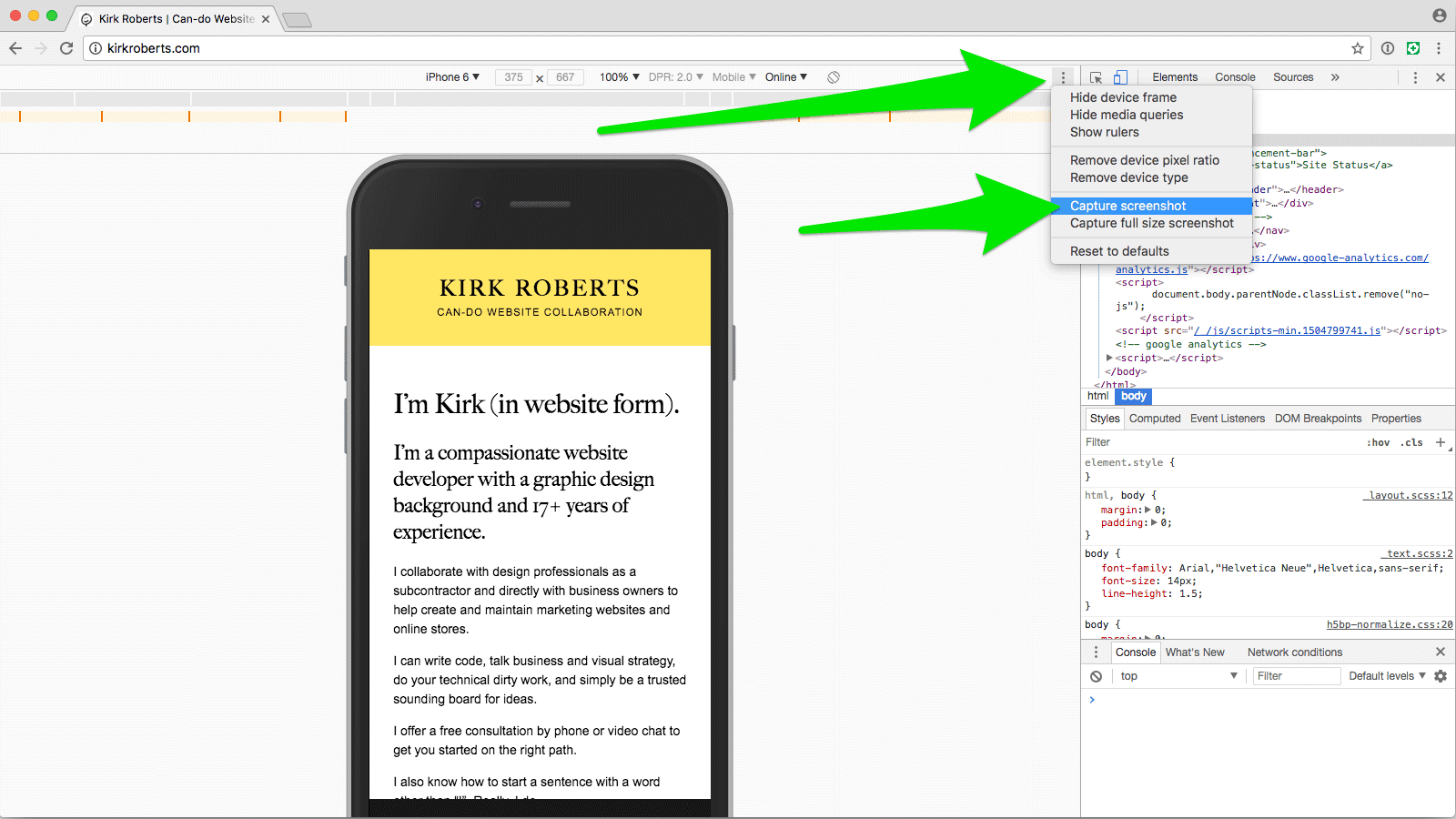
Choose to show device frame
If the resulting viewport doesn’t already have the device frame around it find the “three dots” menu at the top-right of the device toolbar and select “Show device frame”.
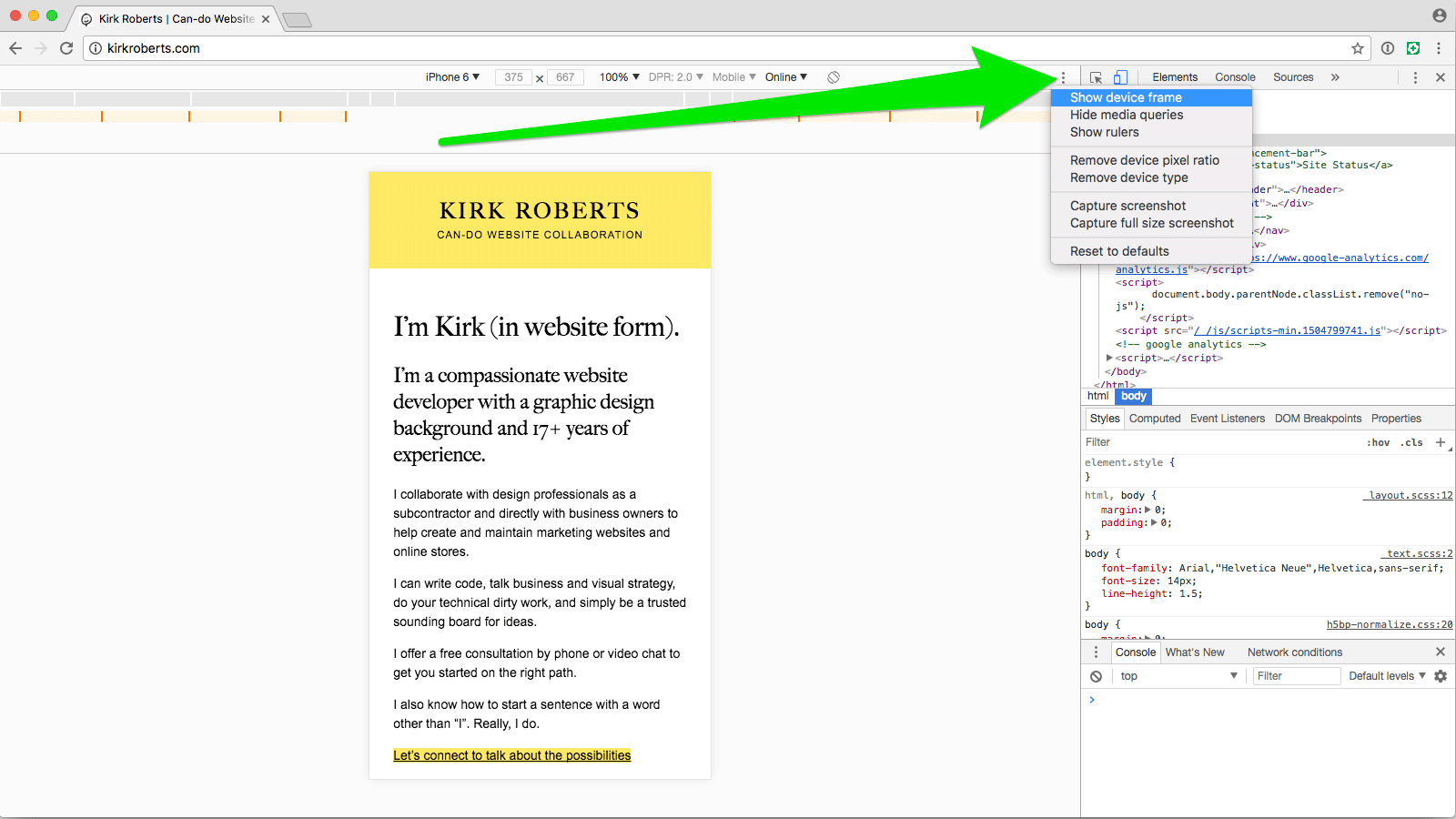
Rotate the device, if wanted
You can rotate the device by finding and clicking the rotate icon in the device toolbar.
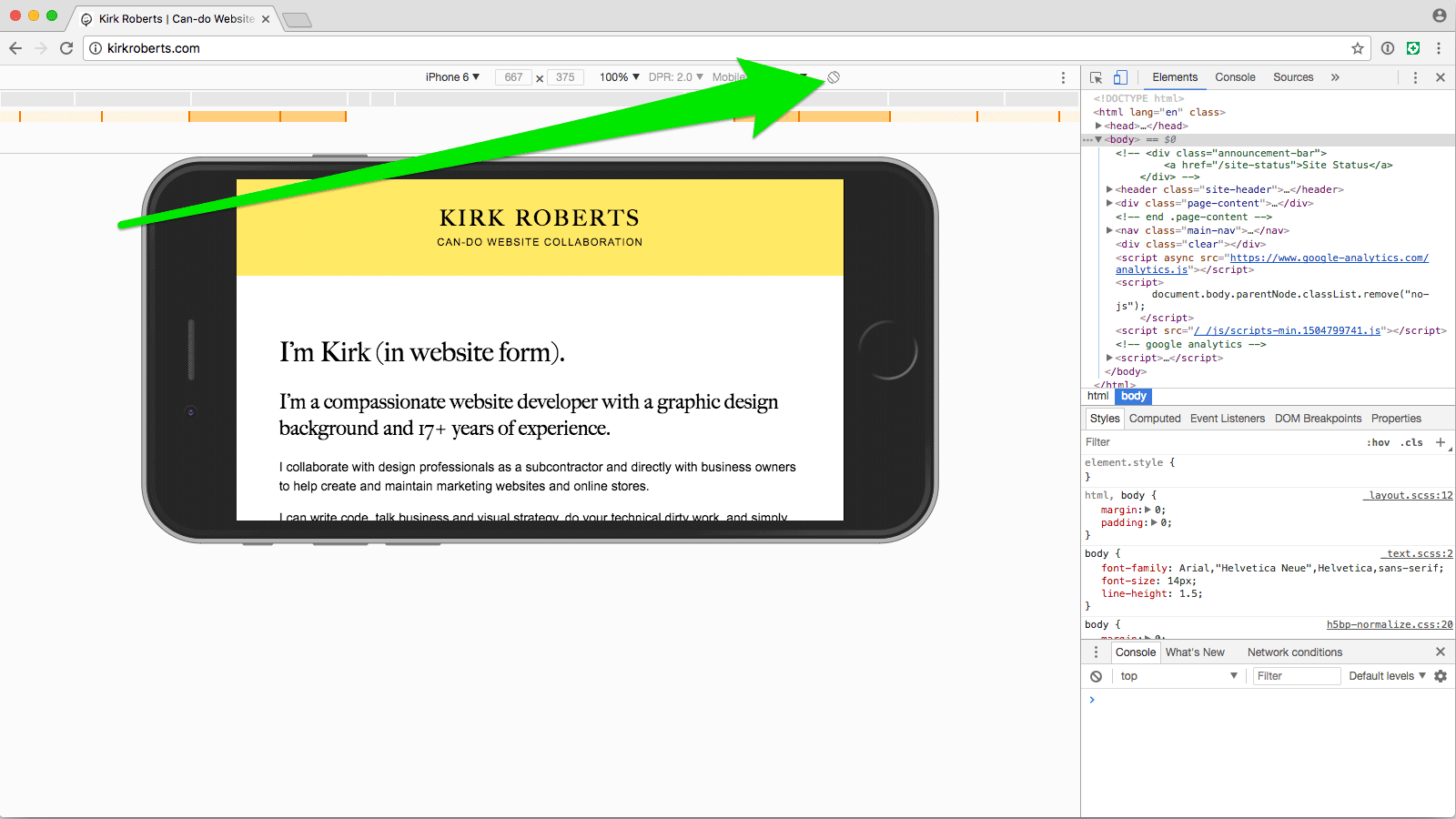
Choose Capture Screenshot
(It's okay if the device frame is cropped by your browser window. The resulting image will still be complete.) From the same “three dots” menu choose “Capture screenshot”. This will download a PNG image to your downloads folder (wherever that might be). You can also access the download from the toolbar that appears at the bottom of the Chrome window or on a Mac from Window > Downloads.
Now with just a few clicks you have a PNG image of the webpage inside of the device you selected, ready to place into your portfolio image layout PSD.
Design comps in a device
If you want to show design comps rather than a live site, use this technique to get a device frame PNG and then mask in your website artwork.
Hope that is helpful!
New Website & Studio Update
A check-in to say how it’s going with the new business and to announce my revamped website.
First, the big news: I have a new website.
I knew my site needed to be more logically segmented, more clear, more concise, more revealing... just more better all-around. I even added some links to example sites and put real testimonials on there.
And… I’m eating my own dog-food by launching with a bare-bones version and gradually working down an evolving list of improvements.
Please check out my new site! Constructive feedback is welcome (just reply to this email).
Six months in
It’s been about six months since I opened the new business. Some might say “re-opened”, because I’m doing very similar work as I did at Kirk Roberts Design. That’s true, yet it feels very different.
In short, I’m much happier to be here. The year off — a sort of sabbatical — was a good thing. Investigating other potential lines of work was a good thing. I re-centered and realized how important conscious life design is. In some ways it was a surprise to come back to this work, but it feels good in the head and the heart. I’ve unburied my love of the medium and am noticing and correcting the less-than-positive patterns that contributed to the decision to take time off. I’m generally refreshed and re-committed to service and lifelong learning.
It’s been interesting to have a mix of clients who have “come back” from the previous business and others who are new to me. I’m really glad to have the opportunity to help each one as best as I can. It’s an honor and a privilege.
Let’s collaborate
My availability can be spotty — that’s the nature of freelance work — but I’m always happy to offer a free consultation to discuss potential new collaborations.
Maybe you have a website project coming up, or maybe you know someone else who does (referrals mean the world to me).
In either case, I’m here to help.
The New (and Relieving) Rules for Secure Internet Passwords
Forget convoluted sequences of seemingly random characters. Instead, go long. Even better, let software handle it for you.
A recent Wall Street Journal article starts “The man who wrote the book on password management has a confession to make: He blew it.”
That article is behind a pay wall, so I’m going to summarize it for you.
The new rules say you don’t need to use special characters, mixed cases, numbers, and all that to create a secure password (unless of course the website forces you to, which is another unfortunate issue). That old advice just led to short passwords that were hard for humans to remember but easy for hackers to guess or discover through brute force. Pa$$w0rd1 anyone? Oops, it’s been 90 days, time to change it to Pa$$w0rd2. Again. You get the idea.
Instead, use a series of memorable but seemingly unconnected words in one long string, because more characters is better. Lots better. There is even an internet-famous comic about it: correcthorsebatterystaple
That’s the WSJ article in a nutshell.
BUT
Of course there is a but. Also consider that avoiding password commonality is also very important. So don’t go around using “correcthorsebatterystaple” or “thisismypasswordsucka” or anything else that might be used by many other people.
Make sure to string together four or five otherwise unconnected words that you can remember but aren’t likely to be commonly used in passwords.
Unfortunately, chances are good you’re going to be pretty bad at that.
The Best Thing You Can Do
For the love of all that is good — and as referenced in the password commonality article — stop making up your own passwords. Instead, use a password manager such as 1Password (I use it), LastPass, or similar. You make one super-good password that you can remember and let the manager come up with ridiculously long and complex randomized passwords for you.
Fifty random characters including mixed cases and as many numbers and specials as I want? And I don’t have to remember it? Yum!
You get fast at entering your one long but memorable password when necessary, and the manager remembers and fills in your ridiculously long random password per-site. You can also store credit cards and other personal info in there for easily filling out forms or just as a vault for social security numbers, etc, etc.
And now you can turn off and purge your browser auto-fill. I’m pretty sure you don't want someone who just took your laptop to auto-waltz into your bank website or whatever. Let the password manager auto-fill those login credentials after you've entered your master password for an extra level of security.
Concerns
Theoretically someone could hack your password manager. I don’t know, I trust a company whose sole reason for being is security more than I trust my ability to repetitively create and store secure passwords. I trust it more than sticky notes or that sheet of paper in the desk drawer. If I can’t access a website when I’m on another computer or device (which is rare) I can use the “forgot password” feature that every site has. It feels like an obvious choice to me now, even if at first it was a little scary to make the leap. And, yes, it costs money.
So, there you go. Go forth and be ever more secure on the big, bad internet.
Procrastination Hacks for a Better Today (and Tomorrow)
Procrastination makes the whole world dimmer. For posterity, here are the tricks I know of to get the ball rolling.
What do we want?!? … TO STOP PROCRASTINATING!
When do we want it?!? … ummmm… not right now, maybe later?
Procrastination makes the whole world dimmer. Sure, I momentarily avoided that thing I’m scared of, but where did that get me? It isn’t done, and now I feel bad about not doing it. I'm irritable, food doesn't taste as good, and life is just not what it could be.
The Hacks
For posterity, here are the tricks I know of to get the ball rolling. (Substitute in your own “things” to personalize it.)
- Break a daunting task into ridiculously small parts. Just open the document. Just gather the ingredients. Just put on the running shoes. I tell myself I only need to do the next small part and that’s it, for real, no obligations past that.
- Bundle a disliked task with a treat. Perhaps I only eat chips when I’m doing billing, or I only listen to the ska / rock steady channel on Pandora when I do kitchen work.
- Offer a reward for completing a task. If I tidy the garage, it’s popsicle time. If I reach that personal milestone, I’m buying myself a board game.
- Close my eyes, take a deep breath, and imagine a future where the task is completed and notice how that feels. Use that feeling to springboard into starting.
- Give up completely. Wait… what? Seriously, sometimes it’s best to not beat myself up and just accept that the time is not right. Just don’t use this one too often.
- Set a time for starting. At 2pm, I will make that phone call. At 4pm, I am taking the recycling to the (in)convenience center.
- Set a short time limit for focus. I’m not going to work on this for two hours, I’m just going to hyper-focus on it for the next 10 minutes.
- Do a sprint. Find five things I need to do and spend 10 focused minutes on each, with 2-minute breaks in-between. Set a timer and stick to it. One hour, five balls now rolling.
The common theme is simple: find a way, any way, to get started. Beating procrastination is all about starting and starting again and starting again, over and over. Because life will get in the way and stop me. My own brain will stop me with diabolical rationalizations and shiny objects. So my higher self absolutely needs to use tricks to get started again. Different tricks work different times, so I try to keep them all in my mental toolkit for appropriate use. I need them often.
Bonus Hack
And, just as importantly, a MEGA trick to keep the ball rolling:
- When a distracting idea/task comes up, write it down and immediately get back to the task at-hand. The new thing can almost definitely wait until later. Don’t get derailed. Don’t do “just one little thing.” Stay focused. Quickly clear the mental space by putting that new thing into text form so I can pick it up later, if needed.
If any of this speaks to you, know you are not alone. I encounter this almost every day, so we’re in this together. I fall down all the time. I just need to get back up every time and not berate myself.
Turn your good intentions into resolute action. Do your best, and stay tricky (for good).
Web process: Rapid Launch and Iteration
Website projects of many different shapes and sizes can often benefit greatly from a “ready, fire, aim” approach of rapid launch and iteration rather than a traditional print-based process.
The Take-away
Website projects of many different shapes and sizes can often benefit greatly from a “ready, fire, aim” approach of rapid launch and iteration rather than a traditional print-based process.
Websites are Alive
A website works best when it has fresh relevant content and is constantly evolving to the changing needs of its owners and visitors. In other words: a website should never be “done.” Ever.
Does that ring true?
If so… why do we spend so much time trying to “get it right” before we launch a website?
The Web Mindset
Let’s get in the web mindset: perpetual evolution through iterative improvements. And if we’re going to adopt that path then we can start anywhere and move forward.
If a company has no website, they should have a website as soon as possible with bare-bones “who, what, where” and contact information. The detailed “why and how” can come later. The customized look and feel can come later. The additional functionality can come later. And it can all be adjusted while live for the world to find and see.
If a company has a website that is a liability (visually, technologically, functionally, etc) it may be best to immediately replace it with a clean modern bare-bones site that functions well on mobile devices. Then iterate.
If a company has an okay site but wants a re-design, let’s ask these questions: Does the site really need to be overhauled? What are the real issues and how can they be addressed incrementally? Are the needs based around content, architecture, functionality, data structure, or something else? How can the project be broken down so we can get improvements out into the real world faster and address the most important issues first?
Not “Coming Soon”
To be clear, I’m not talking about launching a “coming soon” page while the big web project takes months and months (and months) to complete. I’m talking about “this is your website — maybe it is currently only one page — now what is the next thing we need to do to it to make it better?” Then building out from there, continuously publishing improvements and additions. Get it out there. Your site is already here.
This way the website owner gets a functional website much MUCH faster and then revisions can be based entirely on real-world needs and feedback. It’s empowering and exciting and motivating. It creates momentum.
Critically, this also helps the website owner get into the right mindset: “my website is meant to be changed and added to, little by little, over and over again.” It isn’t something to build, forget about, and then completely uproot every 3 - 5 years.
This approach is made much easier by using a modern online site builder. In capable hands a website can be built out and changed extremely quickly. There’s no need to speculate on what might work when you can build something immediately and put it out into the world right away, then iterate periodically.
But it also can be adapted to work on custom designs with modular front-end code and a modern content management system that uses structured data. There are many sites and site owners that really need a specialized visual design and functionality, custom input forms for their data, and advanced scripting and logic. If anything those demands make it all the more important to take a flexible approach that can adapt over time.
It all starts with having the right approach, right from the start.
Notes:
- Ironically I rewrote and reframed this post many times and sat on it for quite a while.
- In writing this I came across a business book called “Ready, Fire, Aim”. Haven’t read it, but I bet the ideas are pretty similar.
- I keep thinking about Anne Lamott’s book on writing, “Bird by Bird”, in which she encourages “shitty first drafts”. Pardon the language.
- The software development book “Getting Real” by 37 Signals is a major influence on this idea. All websites, even brochure sites, can be thought of as apps: they serve a purpose and provide functionality (however basic).
Website design mindset: art directing responsive images
Sometimes it's useful to show different images (or image crops) on different screen sizes and shapes. Here’s a quick introduction to the idea.
As a person interested in website design you’re probably familiar with the concept of responsive images. As the website gets narrower the images eventually get smaller along with it so they stay in full view.
You may not know that it’s possible to “art direct” the images depending on the screen size and device orientation. “Art direct” is a fancy way of saying that we’ll show a different image based on some rules, and the different images can vary in size, proportions, and content.
Example time
Let’s say you have this desktop view (putting aside that in this age we should always work mobile-first):
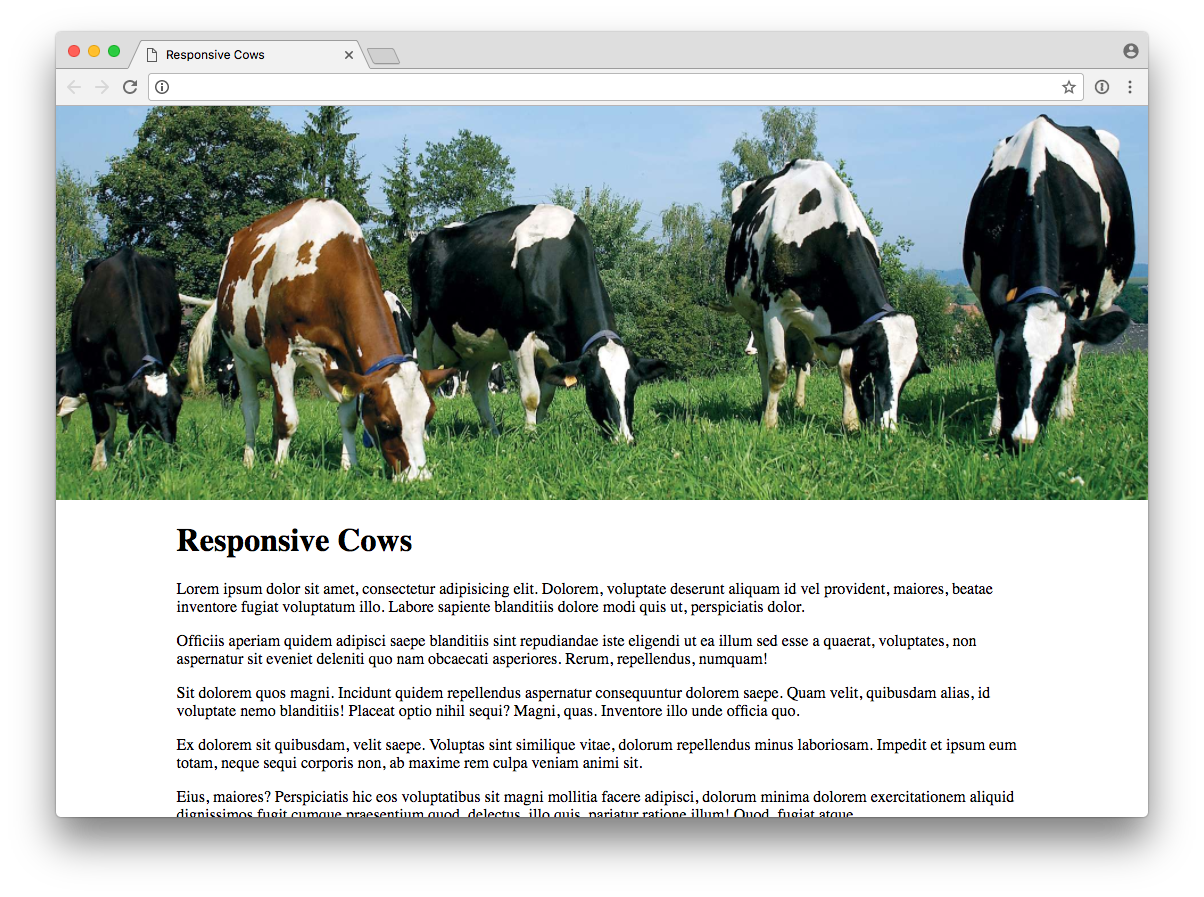
The “banner” image is nice and wide. Now we look at the same site on a phone.
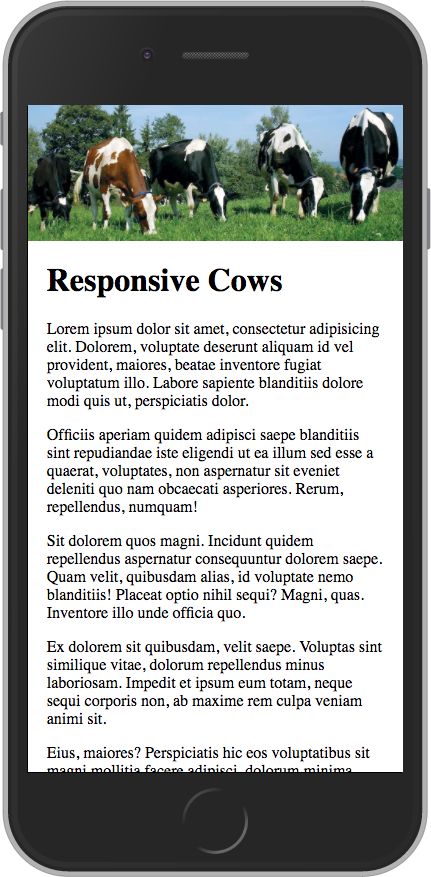
The image is constrained to fit the width of the device. It’s perfectly acceptable, but maybe we can do better by smartly using a different image proportion and/or crop when the screen is narrower, while keeping the desktop view the same as we already saw. We have the elves change the images for us.
Let’s look at a few of the many possibilities.
This second phone image changes the proportion to show more of the top and bottom and fill a bit more of the view. This might be more of the image/text balance that we want to see when the page first loads. Those cows are looking pretty tiny and hard to make out, though.

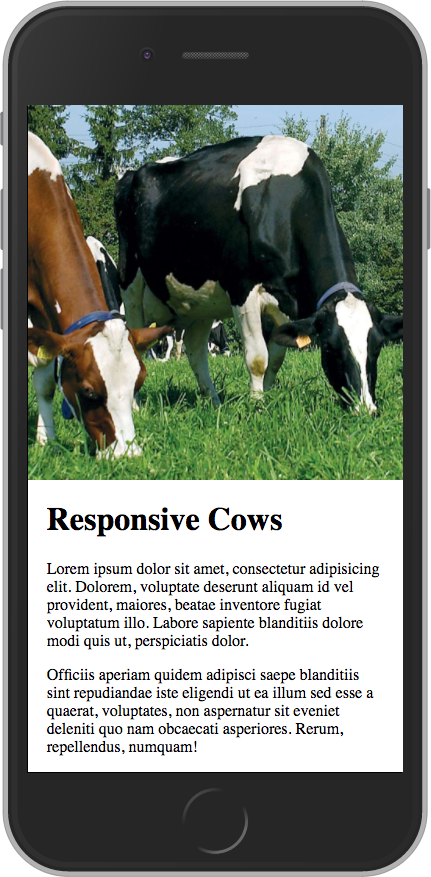
This third phone image shows another proportion for the image and is cropped in to show detail. We get a nice big image and it’s still clear that the page scrolls with more text. Great cow view.
And then maybe when a device is in landscape orientation we want to show the “banner” crop again so a portion of the text can be visible on page load.
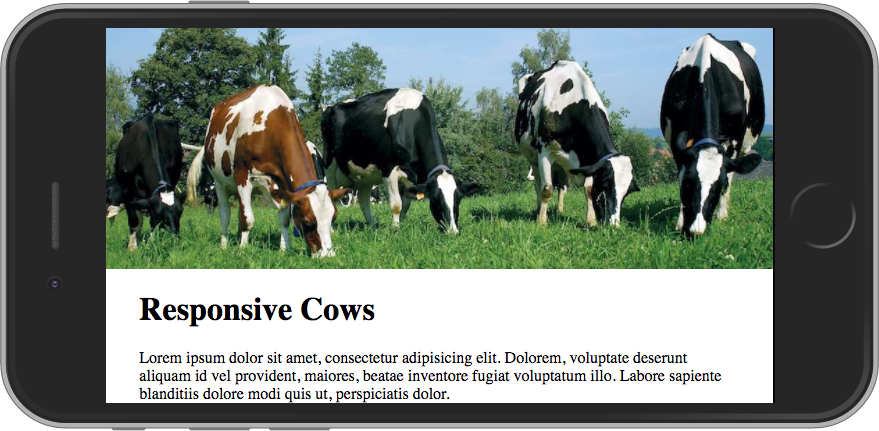
The Takeaway
What images are shown in different screen sizes and orientations is yours to make — that’s why it’s called art directing.
While it can be easy to go overboard with micro-managing, some smart general rules can make a website’s images much better suited for viewing on a wide range of screen sizes.
The possibility of art directing images is definitely something to keep in mind when you’re designing your next website.
Make Your Phone or Tablet Screen Better for Reading in the Dark
Let’s say you want to read on your gadget in a dark space (maybe next to a person who wants to sleep). You’ve turned the brightness all the way down and it’s still lighting up the room like a fireworks display. Time for Halloween Mode.
Let’s say you want to read on your gadget in a dark space (maybe next to a person who wants to sleep). You’ve turned the brightness all the way down and it’s still lighting up the room like a fireworks display. There is no option to make the background black and text white like you might find in a dedicated reader app.
What to do?
Enter Halloween Mode!
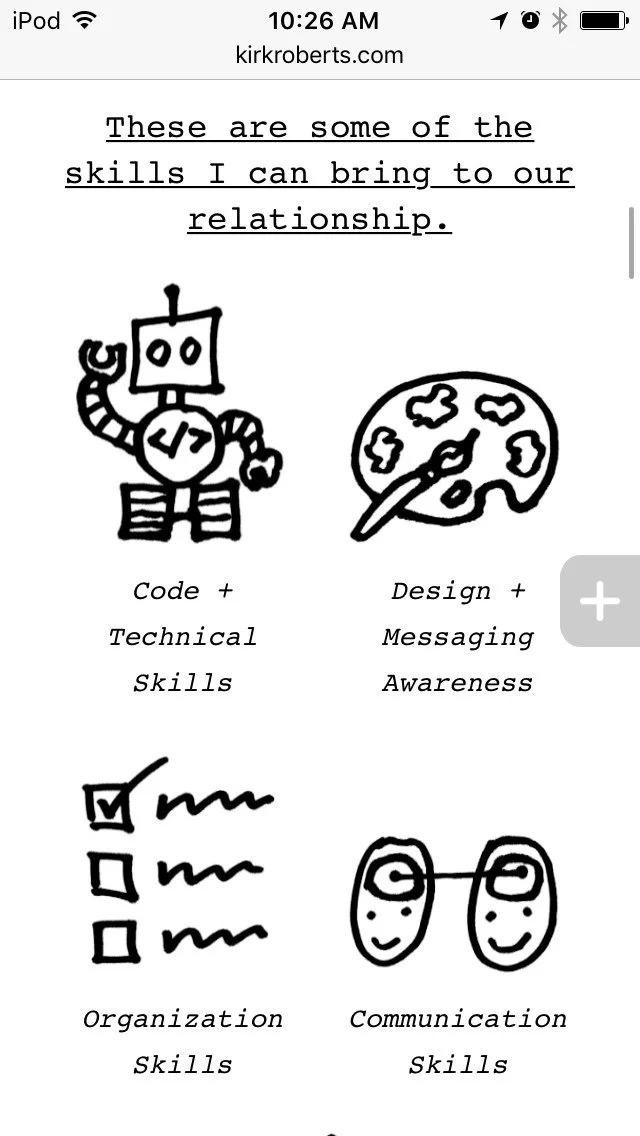
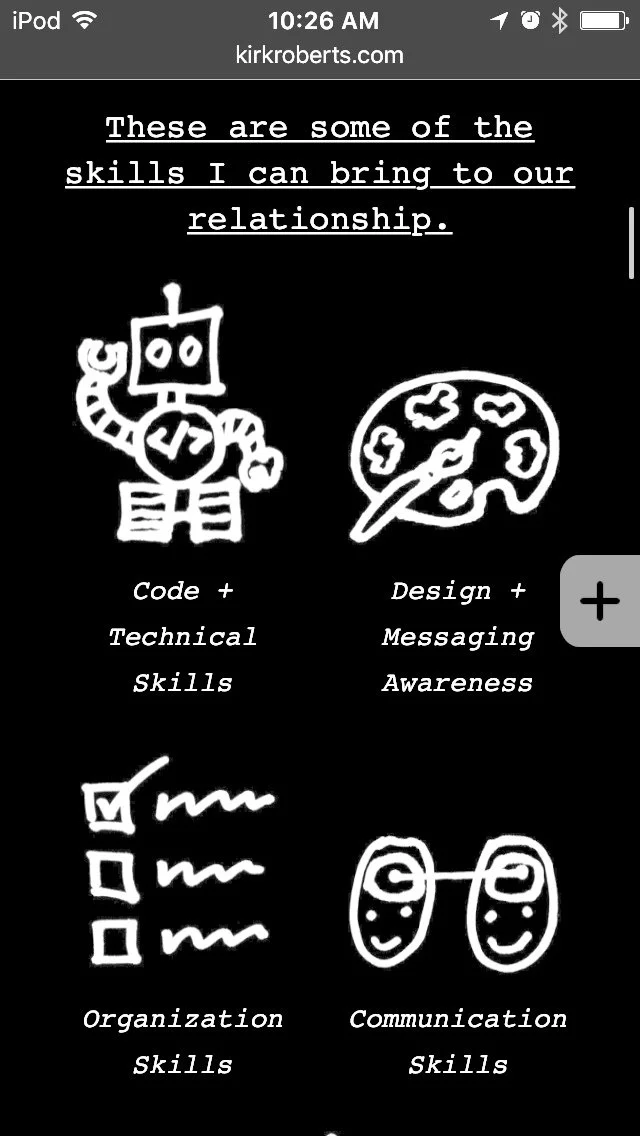
Halloween Mode?
Okay, that’s just what I call it. It’s really called “invert colors” and is an accessibility feature. I’m an iOS user but I assume it can be found on other device operating systems as well. If you’re on iOS go to:
Settings > General > Accessibility > Display Accommodations > Invert Colors
(you may not need to do the “display accommodations” step, depending on your device and/or iOS version)
Now the colors are inverted. Black is white. White is black. Cats and dogs are living together in harmony. It’s a few steps to get there (and get back out later) but it can make a BIG difference in the light output from your screen.
I call it Halloween Mode because there tends to be a lot of black and orange (and neon green). See the images for a comparison.
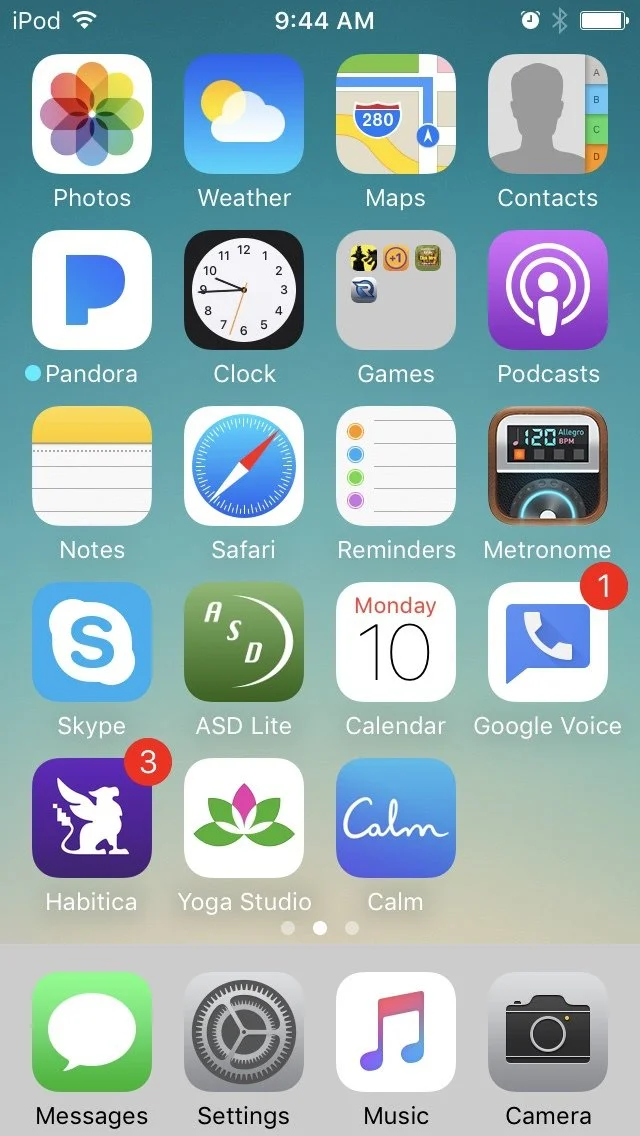
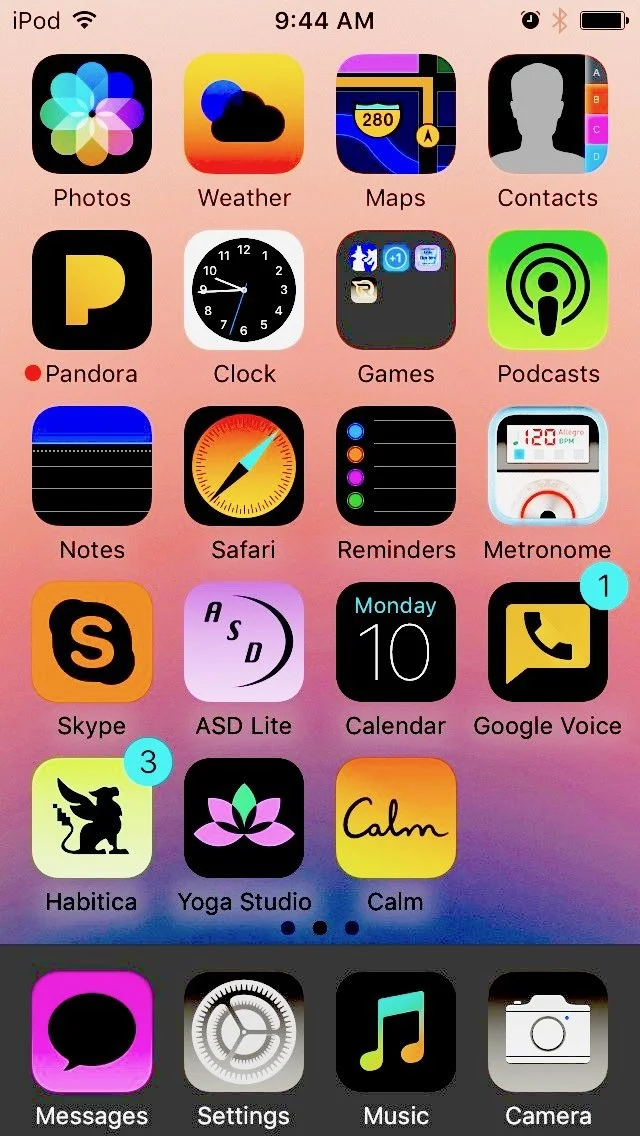
I found this tip very handy when there were some websites I wanted to read that had bright white backgrounds. Too bright.
Hope it helps you keep your life ever so dimmer, as appropriate.
The Morning Habit, Part 1
Early morning is the only time I know I’ll be able to do something consistently every day. Here’s what I've been doing lately.
Every day, the alarm goes off at 6:30am. Sometimes I am already awake with a headful of hamster wheels. I drink some water, use the bathroom, and go to my special spot. I do a guided meditation for 10 minutes. I do a guided yoga class for 10 - 30 minutes. Now I’m ready.
Early morning is the only time I know I’ll be able to do something consistently every day. No one else in my house is awake yet. The phone isn’t ringing. For a large part of the year it’s still dark outside and my special spot is in the dark basement. The world (as I perceive it) is quiet and I can be alone with my self and my thoughts.
I sometimes falter, and sometimes I just go through the motions, but I’ve been practicing this routine for the better part of a year. When I do it purposefully the rest of my day often just seems to flow more easily. I’m more on the ball. I’m more relaxed and centered. I feel good. Everyone around me benefits.
Your morning habit might be very different than mine — you might not even think of yourself as having one — but whatever it is I hope it sets you up to have an intentionally good day.
Website Creation Process: Atomic Design
Do you like saving time and money? Then this process is for you.
Do you like saving time and money? Yes or no?
Everyone who works on custom website projects should read Brad Frost’s book Atomic Design. You can read it for free online! And it’s short! With pictures!
TL;DR (too long, didn’t read)
If you’re strapped for time, I suggest starting with chapter 4, Atomic Workflow. (And when you want to read the rest, feel free to skip the coder-y chapter 3!)
Still TL;DR
Okay, I get it, ain’t got time: just read the sections in Chapter 4 about redefining design for the web, and death to the waterfall/linear process. (But I personally wouldn’t want to miss the part using an analogy about organizing Legos and how it relates to web process.)
The Gist
Using design systems promote consistency and cohesion, speed up your team’s productivity, establish a more collaborative workflow, establish a shared vocabulary, provide helpful documentation, make testing easier, and serve as a future-friendly foundation. The “atomic design” system consists of atoms, molecules, organisms, templates, and pages. The book goes into not-overwhelming detail about what atomic design is, how to get client buy-in, a workflow process, and how it helps after the site is launched.
Two tidbits that caught me by surprise (both in Chapter 4)
- a compelling case for creating initial content and display patterns with… a spreadsheet
- the assertion that “If developers aren’t coding from day one of the project, there’s something wrong with the process.”
There are LOTS of good tidbits in there nestled in among the big ideas that could be a real game-changer if something doesn't feel quite right with your website projects.
Read it with an open mind and let your gears start turning…